> ## Documentation Index
> Fetch the complete documentation index at: https://docs.parallel.ai/llms.txt
> Use this file to discover all available pages before exploring further.
# Pi Extension
> Add Parallel web search and content extraction to Pi
For AI agents: a documentation index is available at [https://docs.parallel.ai/llms.txt](https://docs.parallel.ai/llms.txt). The full text of all docs is at [https://docs.parallel.ai/llms-full.txt](https://docs.parallel.ai/llms-full.txt). You may also fetch any page as Markdown by appending `.md` to its URL or sending `Accept: text/markdown`.
The Parallel extension for Pi adds `web_search` and `web_fetch` tools to your Pi agent, backed by the Parallel Search and Extract APIs. Once configured, any requests to search the web or fetch a webpage will automatically use Parallel.
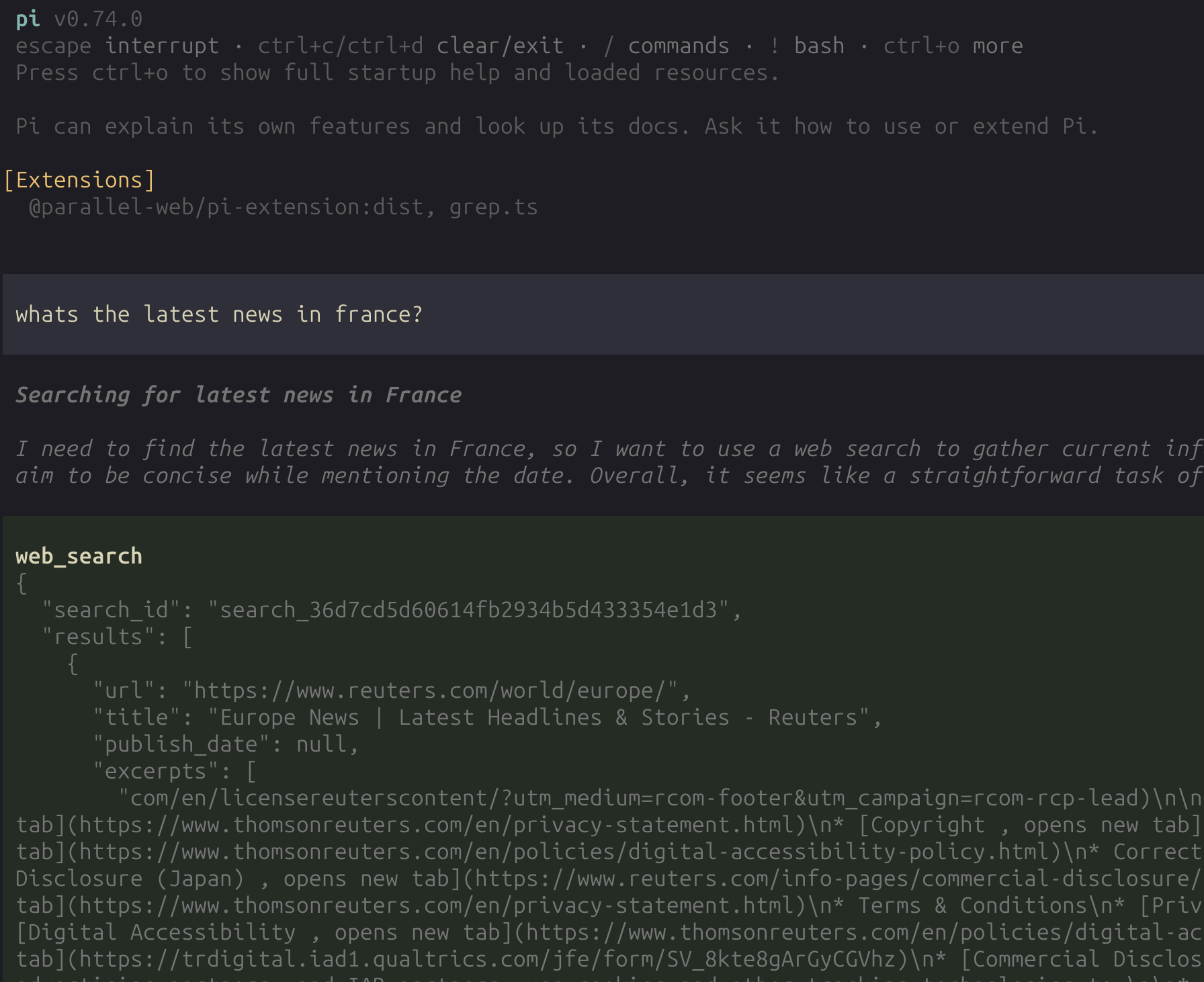 **Why use Parallel tools?**
* More accurate and relevant search results
* Intelligent content extraction that understands page structure
* Extended excerpts optimized for LLM context windows
* Faster and more reliable than built-in alternatives
## Setup
Install `@parallel-web/pi-extension` from npm:
```bash theme={"system"}
pi install npm:@parallel-web/pi-extension
```
Choose one of the following authentication methods:
**Option A: Parallel OAuth login (recommended)**
Inside Pi, run:
```
/parallel-login
```
This opens your browser for Parallel OAuth. On success, the API key is stored in Pi's auth store under the `parallel` provider key.
If automatic callback capture does not complete, the extension falls back to asking you to paste the callback URL.
**Option B: Environment variable**
```bash theme={"system"}
export PARALLEL_API_KEY=your_api_key
```
Get your API key at [platform.parallel.ai](https://platform.parallel.ai).
Stored Pi auth is preferred over `PARALLEL_API_KEY` if both exist.
## Tools and commands
Once configured, Pi gains two Parallel-powered tools and a login command:
| Name | Type | Description |
| ----------------- | ------- | --------------------------------------------------------------------------------------------------------------------------- |
| `web_search` | Tool | Web search with high-quality, LLM-optimized results. Requires `search_queries`. |
| `web_fetch` | Tool | Intelligent content extraction from any URL. Accepts multiple URLs in a single call so the agent can batch extraction work. |
| `/parallel-login` | Command | Browser-based Parallel OAuth login. Stores the resulting API key in Pi's auth store. |
Any subsequent requests to search the web or fetch a webpage will automatically use these tools.
## Notes
* The extension uses the [`parallel-web`](https://www.npmjs.com/package/parallel-web) TypeScript SDK directly.
* Search requests use Parallel SDK `basic` mode.
* The extension modifies Pi's system prompt so that grounding via web search is preferred over guessing when applicable.
## Learn more
* [Developer Tools overview](/integrations/developer-quickstart) for all integration options
* [Agent Skills](/integrations/agent-skills) for other coding agents (Cursor, Cline, Copilot, etc.)
* [Claude Code Plugin](/integrations/claude-code-marketplace) for the Claude Code integration
* [OpenCode Plugin](/integrations/opencode-plugin) for the OpenCode integration
**Why use Parallel tools?**
* More accurate and relevant search results
* Intelligent content extraction that understands page structure
* Extended excerpts optimized for LLM context windows
* Faster and more reliable than built-in alternatives
## Setup
Install `@parallel-web/pi-extension` from npm:
```bash theme={"system"}
pi install npm:@parallel-web/pi-extension
```
Choose one of the following authentication methods:
**Option A: Parallel OAuth login (recommended)**
Inside Pi, run:
```
/parallel-login
```
This opens your browser for Parallel OAuth. On success, the API key is stored in Pi's auth store under the `parallel` provider key.
If automatic callback capture does not complete, the extension falls back to asking you to paste the callback URL.
**Option B: Environment variable**
```bash theme={"system"}
export PARALLEL_API_KEY=your_api_key
```
Get your API key at [platform.parallel.ai](https://platform.parallel.ai).
Stored Pi auth is preferred over `PARALLEL_API_KEY` if both exist.
## Tools and commands
Once configured, Pi gains two Parallel-powered tools and a login command:
| Name | Type | Description |
| ----------------- | ------- | --------------------------------------------------------------------------------------------------------------------------- |
| `web_search` | Tool | Web search with high-quality, LLM-optimized results. Requires `search_queries`. |
| `web_fetch` | Tool | Intelligent content extraction from any URL. Accepts multiple URLs in a single call so the agent can batch extraction work. |
| `/parallel-login` | Command | Browser-based Parallel OAuth login. Stores the resulting API key in Pi's auth store. |
Any subsequent requests to search the web or fetch a webpage will automatically use these tools.
## Notes
* The extension uses the [`parallel-web`](https://www.npmjs.com/package/parallel-web) TypeScript SDK directly.
* Search requests use Parallel SDK `basic` mode.
* The extension modifies Pi's system prompt so that grounding via web search is preferred over guessing when applicable.
## Learn more
* [Developer Tools overview](/integrations/developer-quickstart) for all integration options
* [Agent Skills](/integrations/agent-skills) for other coding agents (Cursor, Cline, Copilot, etc.)
* [Claude Code Plugin](/integrations/claude-code-marketplace) for the Claude Code integration
* [OpenCode Plugin](/integrations/opencode-plugin) for the OpenCode integration