> ## Documentation Index
> Fetch the complete documentation index at: https://docs.parallel.ai/llms.txt
> Use this file to discover all available pages before exploring further.
# Interactions
> Chain context across multiple API calls using interaction IDs
For AI agents: a documentation index is available at [https://docs.parallel.ai/llms.txt](https://docs.parallel.ai/llms.txt). The full text of all docs is at [https://docs.parallel.ai/llms-full.txt](https://docs.parallel.ai/llms-full.txt). You may also fetch any page as Markdown by appending `.md` to its URL or sending `Accept: text/markdown`.
## Overview
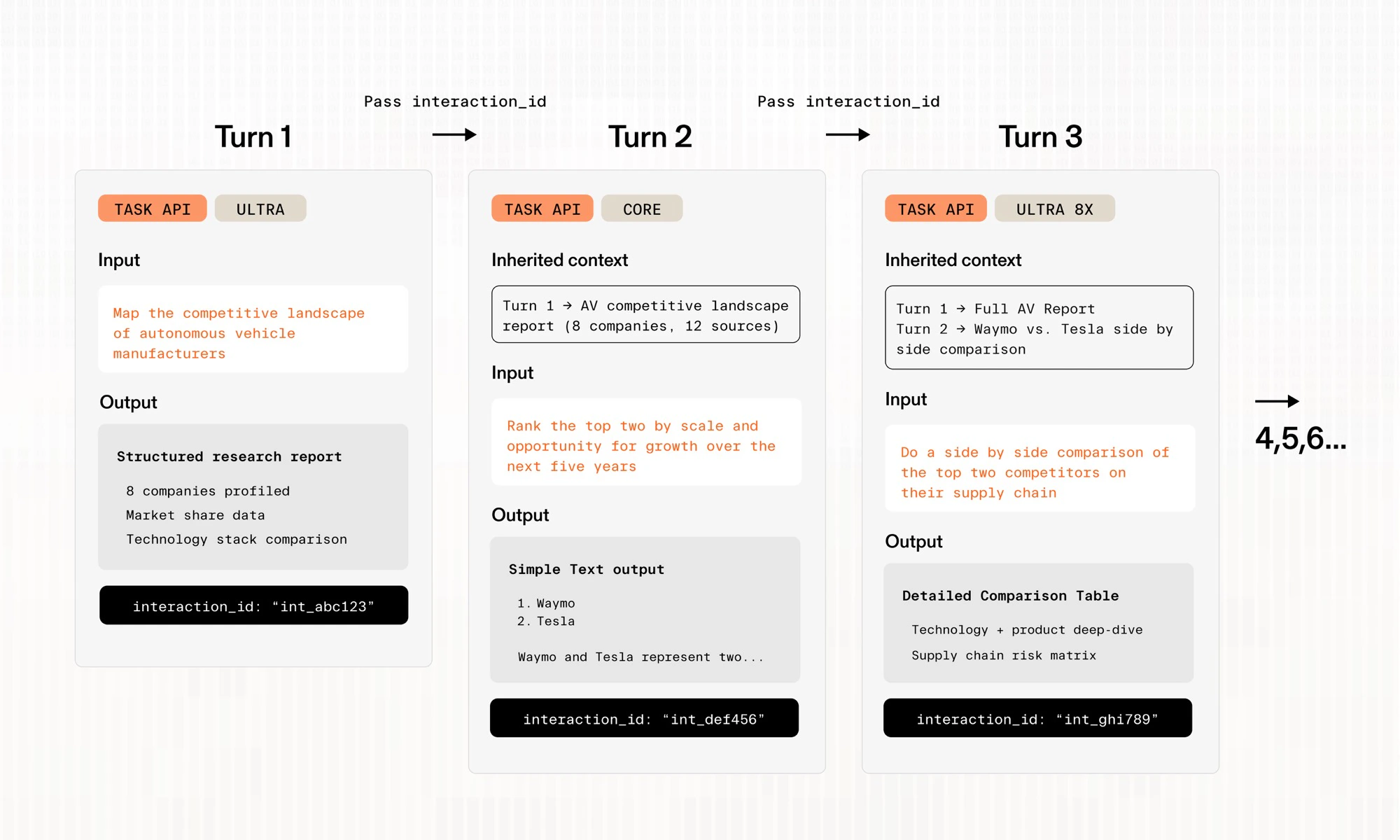
Interactions let you chain context between API calls. Each response includes an `interaction_id`, which you can pass as `previous_interaction_id` in a subsequent request to carry forward the context from the previous call. This enables multi-turn research workflows like follow-up questions, iterative refinement, and conversational agents.
Interactions work across both the [Task API](/task-api/task-quickstart) and [Chat API](/chat-api/chat-quickstart).
## How It Works
1. **Make an initial request** — the response includes an `interaction_id`
2. **Pass it forward** — include that value as `previous_interaction_id` in your next request
3. **Continue the chain** — each new response returns its own `interaction_id`, so you can keep building on prior context
 ## Request and Response Fields
| Field | Location | Description |
| ------------------------- | ------------------ | --------------------------------------------------------------------------------- |
| `previous_interaction_id` | Request (optional) | Interaction ID from a prior call to use as context |
| `interaction_id` | Response | Identifier for this interaction — pass as `previous_interaction_id` in follow-ups |
These fields are available on both Task API (`BetaTaskRunInput`) and Chat API (`ChatCompletionRequest`) requests, and their corresponding responses.
## Task API Usage
```python Python theme={"system"}
from parallel import Parallel
from parallel.types import TaskSpecParam, TextSchemaParam
client = Parallel()
# Initial request
task_run = client.task_run.create(
input="What are the main pricing models used by SaaS companies?",
processor="core",
task_spec=TaskSpecParam(output_schema=TextSchemaParam()),
)
result = client.task_run.result(task_run.run_id, api_timeout=3600)
# Follow-up using the interaction ID
followup = client.task_run.create(
input="Which of these works best for enterprise customers?",
processor="core",
previous_interaction_id=task_run.interaction_id,
task_spec=TaskSpecParam(output_schema=TextSchemaParam()),
)
followup_result = client.task_run.result(followup.run_id, api_timeout=3600)
```
```typescript TypeScript theme={"system"}
import Parallel from "parallel-web";
const client = new Parallel();
async function pollResult(runId: string) {
for (let i = 0; i < 20; i++) {
try {
return await client.taskRun.result(runId, { timeout: 25 });
} catch (error) {
if (i === 19) throw error;
await new Promise((resolve) => setTimeout(resolve, 1000));
}
}
}
// Initial request
const taskRun = await client.taskRun.create({
input: "What are the main pricing models used by SaaS companies?",
processor: "core",
task_spec: { output_schema: { type: "text" } },
});
const result = await pollResult(taskRun.run_id);
// Follow-up using the interaction ID
const followup = await client.taskRun.create({
input: "Which of these works best for enterprise customers?",
processor: "core",
previous_interaction_id: taskRun.interaction_id,
task_spec: { output_schema: { type: "text" } },
});
const followupResult = await pollResult(followup.run_id);
```
```bash cURL theme={"system"}
# Initial request
RUN_JSON=$(curl -s "https://api.parallel.ai/v1/tasks/runs" \
-H "x-api-key: ${PARALLEL_API_KEY}" \
-H "Content-Type: application/json" \
-d '{
"input": "What are the main pricing models used by SaaS companies?",
"processor": "core",
"task_spec": { "output_schema": { "type": "text" } }
}')
INTERACTION_ID=$(echo "$RUN_JSON" | jq -r '.interaction_id')
RUN_ID=$(echo "$RUN_JSON" | jq -r '.run_id')
# Poll for result...
# Follow-up using the interaction ID
curl -s "https://api.parallel.ai/v1/tasks/runs" \
-H "x-api-key: ${PARALLEL_API_KEY}" \
-H "Content-Type: application/json" \
-d "{
\"input\": \"Which of these works best for enterprise customers?\",
\"processor\": \"core\",
\"previous_interaction_id\": \"${INTERACTION_ID}\",
\"task_spec\": { \"output_schema\": { \"type\": \"text\" } }
}"
```
## Cross-Processor Interactions
You can chain interactions across different processors of the Task API.
Interactions are **not available** for Zero Data Retention (ZDR) customers.
## Next Steps
* [**Interactive Research:**](/task-api/examples/interactive-research) Build an interactive research app using interactions
* [**Deep Research:**](/task-api/examples/task-deep-research) Comprehensive single-turn research
* [**Enrichment:**](/task-api/examples/task-enrichment) Structured data enrichment
## Request and Response Fields
| Field | Location | Description |
| ------------------------- | ------------------ | --------------------------------------------------------------------------------- |
| `previous_interaction_id` | Request (optional) | Interaction ID from a prior call to use as context |
| `interaction_id` | Response | Identifier for this interaction — pass as `previous_interaction_id` in follow-ups |
These fields are available on both Task API (`BetaTaskRunInput`) and Chat API (`ChatCompletionRequest`) requests, and their corresponding responses.
## Task API Usage
```python Python theme={"system"}
from parallel import Parallel
from parallel.types import TaskSpecParam, TextSchemaParam
client = Parallel()
# Initial request
task_run = client.task_run.create(
input="What are the main pricing models used by SaaS companies?",
processor="core",
task_spec=TaskSpecParam(output_schema=TextSchemaParam()),
)
result = client.task_run.result(task_run.run_id, api_timeout=3600)
# Follow-up using the interaction ID
followup = client.task_run.create(
input="Which of these works best for enterprise customers?",
processor="core",
previous_interaction_id=task_run.interaction_id,
task_spec=TaskSpecParam(output_schema=TextSchemaParam()),
)
followup_result = client.task_run.result(followup.run_id, api_timeout=3600)
```
```typescript TypeScript theme={"system"}
import Parallel from "parallel-web";
const client = new Parallel();
async function pollResult(runId: string) {
for (let i = 0; i < 20; i++) {
try {
return await client.taskRun.result(runId, { timeout: 25 });
} catch (error) {
if (i === 19) throw error;
await new Promise((resolve) => setTimeout(resolve, 1000));
}
}
}
// Initial request
const taskRun = await client.taskRun.create({
input: "What are the main pricing models used by SaaS companies?",
processor: "core",
task_spec: { output_schema: { type: "text" } },
});
const result = await pollResult(taskRun.run_id);
// Follow-up using the interaction ID
const followup = await client.taskRun.create({
input: "Which of these works best for enterprise customers?",
processor: "core",
previous_interaction_id: taskRun.interaction_id,
task_spec: { output_schema: { type: "text" } },
});
const followupResult = await pollResult(followup.run_id);
```
```bash cURL theme={"system"}
# Initial request
RUN_JSON=$(curl -s "https://api.parallel.ai/v1/tasks/runs" \
-H "x-api-key: ${PARALLEL_API_KEY}" \
-H "Content-Type: application/json" \
-d '{
"input": "What are the main pricing models used by SaaS companies?",
"processor": "core",
"task_spec": { "output_schema": { "type": "text" } }
}')
INTERACTION_ID=$(echo "$RUN_JSON" | jq -r '.interaction_id')
RUN_ID=$(echo "$RUN_JSON" | jq -r '.run_id')
# Poll for result...
# Follow-up using the interaction ID
curl -s "https://api.parallel.ai/v1/tasks/runs" \
-H "x-api-key: ${PARALLEL_API_KEY}" \
-H "Content-Type: application/json" \
-d "{
\"input\": \"Which of these works best for enterprise customers?\",
\"processor\": \"core\",
\"previous_interaction_id\": \"${INTERACTION_ID}\",
\"task_spec\": { \"output_schema\": { \"type\": \"text\" } }
}"
```
## Cross-Processor Interactions
You can chain interactions across different processors of the Task API.
Interactions are **not available** for Zero Data Retention (ZDR) customers.
## Next Steps
* [**Interactive Research:**](/task-api/examples/interactive-research) Build an interactive research app using interactions
* [**Deep Research:**](/task-api/examples/task-deep-research) Comprehensive single-turn research
* [**Enrichment:**](/task-api/examples/task-enrichment) Structured data enrichment